Open an Investment Portfolio

Start your investment journey easily and quickly, without the need to visit a branch.
Open an Investment Portfolio

Enter the world of investments with just a few clicks

From the comfort of your own space, you can now take your first step into investing. 

You can open an individual and/or joint investment portfolio and gain access to a wide range of investment services and products, exclusively through Internet Banking. Within a few minutes, you will have access to investment options tailored to your needs and aligned with your investment profile*. 

* The provision of investment services is subject to the completion of all required assessments and evaluations, in accordance with the applicable legislative and regulatory framework, as well as the internal procedures of the Bank.

Choose an individual or a joint portfolio

Select the markets that interest you

Complete the process in a few simple steps

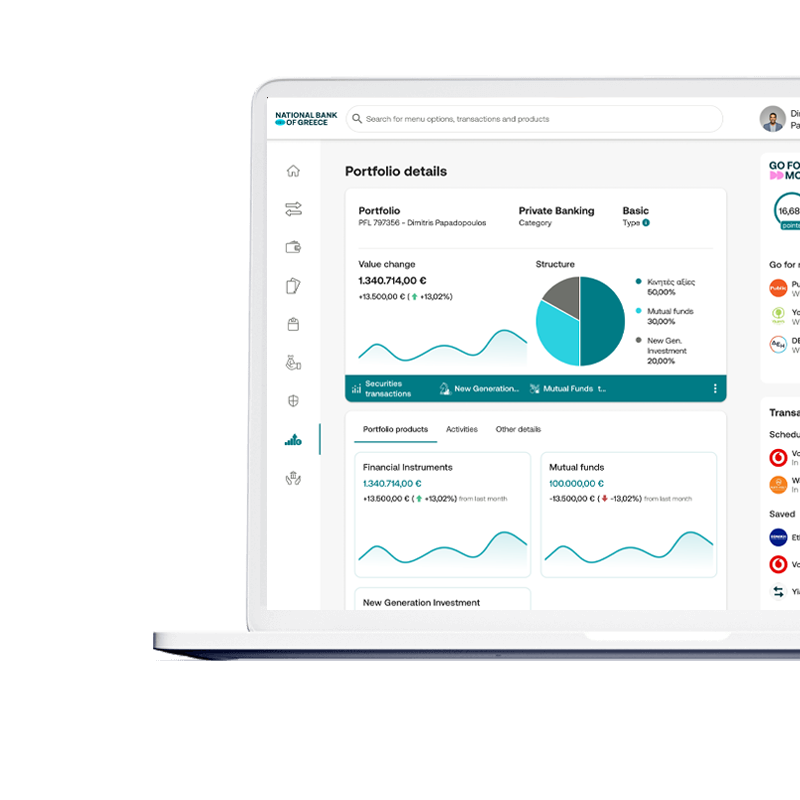
View the details of your portfolio

Choose an individual or a joint portfolio

Select the markets that interest you

Complete the process in a few simple steps

View the details of your portfolio

Choose an individual or a joint portfolio
Select the markets that interest you
Complete the process in a few simple steps
View the details of your portfolio

Open an investment portfolio in a few steps

How to open an investment portfolio
Log in to Internet Banking and navigate to the “Investments” section. Select “Open Portfolio” and choose between an individual or a joint portfolio. Then, select the deposit account you wish to link to your investment portfolio.
Trading Options
Select the markets in which you wish to operate, should you also want to carry out stock market transactions. If you already hold an investor trading account, you will need to enter the Securities Account and Investor Trading Account numbers associated with your existing registration on Euronext Securities Athens or on foreign markets. If you do not currently hold an investor trading account, or if you wish to create a new one, you may select the option to create one during this step.
Signing of Investment Services Agreement
Review the Investment Services Agreement (ISA) and accept the terms by applying your approved digital signature.
Provider’s Code
Enter the verification code you will receive from the Digital Certificate Provider. Then, review and accept the Terms of Use.
Confirmation
Verify your portfolio details and personal information and enter the One-Time Password (OTP) to proceed.
Completion
Upon successful submission of the OTP, you will be notified regarding the outcome of your portfolio opening application. If the process is completed successfully, you can view your portfolio details at any time under the “Investments” section.

Do you have any questions?

An investment portfolio is your dedicated investment account through which you maintain a complete overview and record of your investments in products such as, but not limited to, mutual funds, stocks, and bonds.
An investor trading account is a unique identifier required in order to carry out transactions on Euronext Securities Athens.

I. Submission of a new application for stock market activity

If you wish to activate stock market trading (Greece / Foreign Markets) on an existing investment portfolio where this feature has not been previously enabled, select the “New Application” button located in the “Stock Markets” tab. In the first step, select the stock market in which you wish to operate. 

II. Confirmation

In the next step, enter the One-Time Password (OTP) to confirm the accuracy of your portfolio details and personal information.

III. Completion

Upon successful submission of the OTP, you can monitor the progress of your application through the “Stock Markets” tab within your existing portfolio.
If your request to activate stock market trading has been successfully processed, the updated portfolio details will be displayed in the “Investments” section. In cases where requests remain pending — such as a registration request with Euronext Securities Athens — please allow time for final approval before proceeding with trading.

Digital Banking on your computer, tablet, and mobile

With one application, you have many advantages
I shop online, from wherever I may be
I save time by making digital transactions
I can access my transactions at any time
Freeze/unfreeze my card for online transactions, ATM withdrawals, POS transactions, contactless transactions, transactions abroad, magnetic stripe transactions.
Report loss/theft
Manage my purchase limits and contactless transactions

Enjoy the ease and convenience of Digital Banking

NBG Mobile Banking App

Choose the corresponding store to download the application to your mobile.
App StoreGoogle PlayHuawei AppGallery

Internet Banking

Sign up to manage your transactions, monitor your accounts, and get lots of online features.
Sign up today Sign up today

You may also like

Find even more information that can help you meet your needs

Our customer service team is here for you

Our highly trained team is waiting to answer any questions you may have, in person or by phone.  
Close
Close
back-to-top